Google Ads Impression Share: 7 Ways to Show Your Ads More

Table of contents
Your ads are live, approved and bidding, yet they seem to turn up for a fraction of the searches you expected. Two columns in your account explain almost every impression you did not get, and they point in opposite directions. One says your money ran out. The other says you lost the auction.
Applying the wrong fix is worse than doing nothing. Raising bids when your budget is already exhausted simply empties it faster. (If your ads are not appearing at all, start with checking whether they are running, because impression share will not diagnose a disapproval or a paused campaign.)
How to read the impression share columns
The basic calculation
Google defines search impression share as “the impressions you’ve received on the Search Network divided by the estimated number of impressions you were eligible to receive.”
The second half of that sentence is the part people skip. Eligibility is an estimate, and Google’s impression share overview says it draws on your targeting settings, approval statuses and quality. You are measured against the searches you could have entered, not every search in your category.
Where to find the columns
They sit behind the columns icon in your Campaigns, Ad groups or Keywords view, inside the Competitive metrics section rather than under performance.
Add Search impr. share alongside both lost columns. One without the other two gives you a score with no reason attached.
Be patient with the figures. Google says data can take 24 to 48 hours to process, so judge a change after a few days rather than the same afternoon.
Budget or rank: which one are you losing to
Google’s wording on the two lost columns is precise:
- Search lost IS (budget) is “the percentage of time that your ads weren’t shown on the Search Network due to insufficient budget.”
- Search lost IS (rank) is “the percentage of time that your ads weren’t shown on the Search Network due to poor Ad Rank in the auction.”
Both definitions come from Google’s guide to lost impression share (budget) and (rank). Budget loss means you were good enough to show and had nothing left to spend. Rank loss means you had money available and were beaten anyway.
Ad Rank itself comes from your bid, your ad and landing page quality, the expected impact of your assets and the context of each search, all weighed against the competition, and the Ad Rank guide covers each factor.
The three numbers add up
Your impression share and the two lost columns together account for roughly all of your eligible impressions. That makes the diagnosis mechanical rather than a judgement call.
Hold 40 percent impression share and the other 60 percent sits in those two columns. Whichever is larger is the problem to work on first, and the smaller one can usually wait.
Two accounts can show the same 40 percent and need nothing in common. One reading 45 percent lost to budget and 15 percent lost to rank has a money problem. One reading 10 percent lost to budget and 50 percent lost to rank has a quality problem. Raising bids helps the second and harms the first.
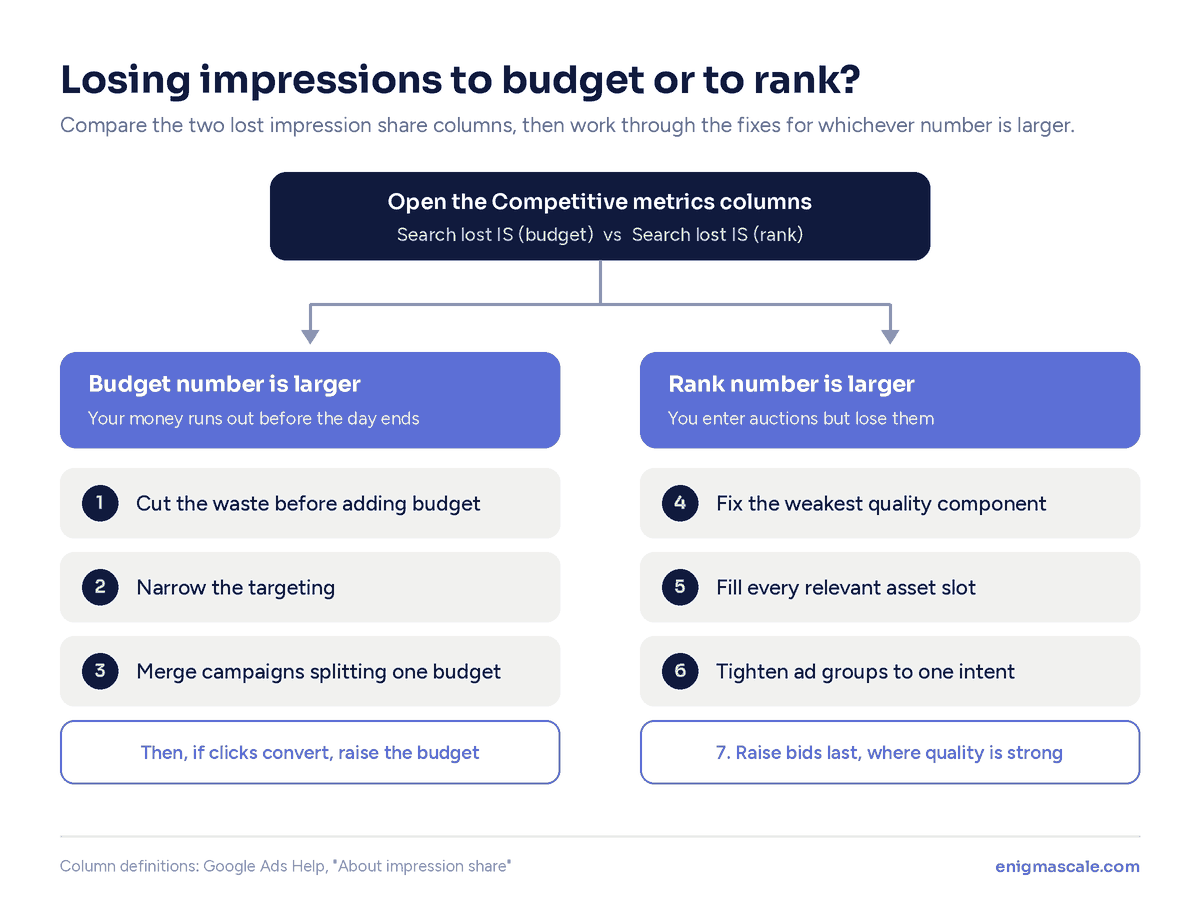
If you are losing to budget
The instinct here is to spend more. Three fixes come first, because each one raises impression share on the searches you care about without adding a dollar.
1. Cut the waste before you add budget
Look at where the current budget goes. Plenty of accounts are funding searches they would never have chosen on purpose.
Open the search terms report, add the irrelevant terms as negatives, and pause the keywords with real spend and no conversions. The money they were burning moves to the keywords that earn it.
2. Narrow the targeting rather than widening the wallet
Impression share is a ratio, so shrinking the denominator works as well as growing the numerator. Google’s own tips for improving impression share list decreasing your regional targets for exactly this reason. If your eligible impressions include suburbs you do not service or hours when nobody answers the phone, you are being scored against auctions you never wanted.
Tighten the location radius, switch to presence-only targeting, and run an ad schedule that matches the hours you can respond.
Presence-only is the setting Australian accounts miss most often. By default, Google’s advanced location options include people who have shown interest in your area as well as people in it, which can pull in overseas searches that mention your city. Every one of those counts against your eligible impressions.
3. Merge the campaigns splitting one budget
Budget is set per campaign, so six campaigns on a modest monthly figure give each one a few clicks a day and guarantee budget loss across all of them.
Consolidating feels backwards and usually lifts impression share quickly, for the same reason fewer campaigns outperform more of them on a fixed budget. Only once all three are done does a bigger budget make sense, and by then you will know it is going to the right searches.
If you are losing to rank
Rank loss has two levers, quality and bid. Quality is the cheaper one, so it goes first and bidding goes last.
4. Fix the quality component dragging your rank
Add the Expected CTR, Ad Relevance and Landing Page Experience columns, sort by cost, and work only the expensive keywords reading Below average.
Each component fails for a different reason, so reading them correctly matters more than the score itself. A landing page problem will not be fixed by another round of ad copy.
5. Fill every asset slot, because it is free rank
Expected asset impact feeds into Ad Rank, yet many accounts leave half the asset types empty. Sitelinks, callouts, structured snippets, call and location assets all count.
When you are losing to rank, this is the highest-return hour available. Assets cost nothing and also widen your ad on the page.
One caveat. Assets only help when they are eligible to serve, so four sitelinks pointing at thin or broken pages add nothing to your rank or your impression share.
6. Tighten the ad groups so relevance carries you
Ad relevance is assessed per keyword, so an ad group holding three different intents drags down everything inside it. One ad cannot speak to all three.
Splitting those groups usually improves rank without touching a bid. Where the landing pages behind them do not match either, that is a site problem rather than an account problem.
7. Raise bids last, and only where quality is strong
Bidding is the fastest way to lift impression share and the only fix here that raises your costs rather than lowering them. It works best on keywords already reading Average or Above average.
Raise bids on weak keywords and you buy the same poor performance at a higher price. That is why this sits at the bottom of the list. If rank loss persists after all four fixes and the keywords are profitable, a higher bid is now money well placed.
Frequently asked questions
Why does my impression share show a dash? Google notes that a dash usually means insufficient data, such as low traffic or new keywords. It is not an error and it is not a poor score. Give the keyword more time or read the figure at ad group or campaign level instead.
Does pausing keywords increase impression share? It can. Pausing removes those auctions from your eligible total and frees budget for the rest, which is a real gain rather than a reporting quirk.
Vignesh runs paid media, social and design at Enigma Scale. He has managed spend across every major ad platform and rebuilt the sites those clicks land on, which is usually where the real problem turns out to be.
More from Vignesh →