Ad Rank in Google Ads: what moves it and what does not

Table of contents
Two plumbers bid on “emergency plumber Brisbane”. The first bids AUD 12 a click, runs a headline that says “Quality Plumbing Services” and sends every click to the homepage. The second bids AUD 8, puts “Emergency Plumber Brisbane” in the first headline, adds sitelinks and a call asset, and lands the click on a page about after-hours callouts. The AUD 8 ad takes the top spot, and it pays no more than AUD 8 to hold it.
That outcome is Ad Rank at work. Ad Rank decides whether your ad shows, where it sits, and what you pay per click. Google builds it from six factors, but only three respond to anything you do: your bid, your ad and landing page quality, and your ad assets. Thresholds, auction competitiveness and search context are set by Google, by your competitors or by the searcher. Most accounts improve fastest by fixing the quality signal, because it is the one lever that can lower your costs instead of raising them.
You will never see the score itself. It is missing from every report, and Google says Ad Rank “is calculated every time a user does a search”, then recalculated for each position on the page. It still governs your position and your price at the same time, which makes it worth understanding properly.
The six factors Google uses
Google publishes six factors that determine Ad Rank, all assessed fresh at every auction:
- Your bid: the maximum you are willing to pay for a click.
- Ad and landing page quality: how relevant and useful your ad and page are to the person searching.
- Ad Rank thresholds: the minimum score an ad must reach to be eligible for a given position.
- Competitiveness of the auction: how closely your score sits to the advertisers around you.
- Context of the search: the terms used, plus location, device, time of day and other live signals.
- Expected impact of assets: whether your sitelinks, callouts and other assets and ad formats are likely to improve performance.
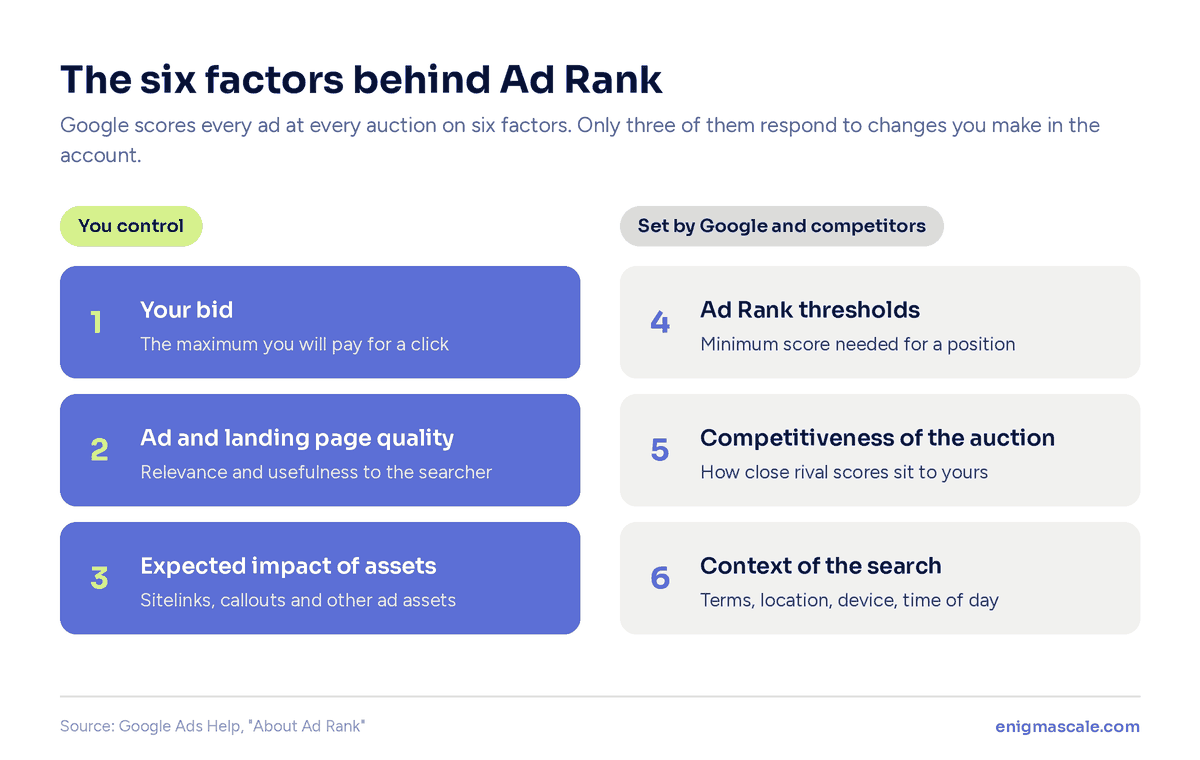
Bid is listed first and quality second, but quality is no tie-breaker. It works alongside the bid in every auction, which is why a well-built account can outrank a competitor bidding considerably more, as the plumber example shows.
Three that respond to your work
Bid, quality and assets are the full extent of your influence. Everything you do in the account lands on one of those three.
Two of them cost nothing to improve. Better relevance and more useful assets do not add a cent to your bid, and Google states plainly that higher quality ads “can often lead to lower CPCs”. Bid is the only lever that buys position by spending more, and the only one that stops working the moment you stop paying.
Three you cannot touch
Thresholds are set by Google. Competitiveness depends on who else turned up to the auction. Context belongs to the searcher.
Knowing this saves time. If your ads stopped showing last week and nothing in your account changed, the likely cause is a competitor raising bids or a threshold shifting. Rewriting your ad copy will not fix that, and knowing which half of the formula is out of reach stops you optimising against noise.
Two numbers attract more effort than any of the six factors, and neither sits in the auction. Google’s help page says “Quality Score is not an input in the ad auction”, and Google Ads Liaison Ginny Marvin said in April 2024 that “Ad Strength is not used in Ad Rank”. Ad quality feeds the auction through Google’s own live assessment at search time; the 1 to 10 figure in your keyword column and the Poor to Excellent label on your ads are reports about that quality, so treat them as diagnostics rather than targets.
How Ad Rank relates to the metrics you can see
Since Ad Rank stays hidden, you read it through four other numbers. Each has its own deep dive.
- Quality Score: a keyword-level summary of expected CTR, ad relevance and landing page experience, the same things the auction’s quality factor looks at. Use it to find the weak component, as covered in how to check and improve Quality Score.
- Ad Strength: a rating of how much headline and description variety your responsive search ad gives Google to test. It helps up to a point and has no weight in the auction, which is why chasing Excellent is rarely worth it.
- Impression share: the share of eligible impressions you received. The “lost to rank” figure is the closest thing to an Ad Rank report Google gives you, and the impression share guide explains how to read it against budget losses.
- Top-of-page rate: how often your ad appears above the organic results. Top positions carry higher thresholds, so this is where weak Ad Rank shows first; getting ads to the top of the page covers the fixes.
Seven ways to improve your Ad Rank
1. Read the three quality columns before changing anything
Add the Expected CTR, Ad Relevance and Landing Page Experience columns to your keyword view. Each reports as Below average, Average or Above average, and the one marked Below average is where the problem sits.
Work the list by spend rather than by score. A keyword rated Below average that spent AUD 40 last month deserves more attention than one scoring 2 out of 10 that spent nothing.
2. Put the search language in your headlines
Ad relevance measures how closely your ad matches the intent behind the search. Google’s own advice is to “match the language of your ad text more directly to user search terms.”
The first plumber in the opening example had a perfectly suitable business and a weak relevance signal, because “Quality Plumbing Services” repeats none of the searcher’s words. Use their words, not your brand language.
3. Send the click to a page built for that search
Landing page experience is the slowest component to improve and the one that drags longest when broken. Google looks at relevance to the search, usefulness, mobile friendliness and load speed.
The usual failure is routing every keyword to the homepage. A homepage is relevant to nobody in particular, which is exactly what the signal measures. If no page on your site matches the search, that is a web design problem rather than a bidding problem.
4. Fill every asset slot that fits
Expected asset impact is a named Ad Rank factor, yet plenty of accounts leave half the asset types empty. Sitelinks, callouts, structured snippets, call, location and image assets all count.
Quantity alone is not the aim. Sitelinks pointing at thin pages add little, and an asset set written once at account level can sit awkwardly on campaigns whose searches are quite different. Write assets for the searches each campaign serves.
5. Split ad groups carrying more than one intent
Ad relevance is reported per keyword, so a loose ad group drags down everything inside it. One ad cannot be highly relevant to twenty different intents at once.
Google’s advice when relevance is weak is to split those ad groups into smaller ones that better match the searches. Keeping the keyword count inside each group tight is the same fix stated a different way.
6. Cut the keywords dragging your average down
Pause keywords showing Below average on two or more components alongside meaningful spend and no conversions. They burn budget and produce poor matches between search, ad and page.
In a neglected account this is usually the fastest visible win, and it is where our Google Ads audits begin. We have cut keyword lists by two thirds in audits, because the gain here comes from subtraction rather than addition.
7. Raise bids last, and only where quality is strong
Once your components read Average or Above average, a bid increase converts cleanly into position. Before that point it just makes you pay more for the same weak ad.
Raising bids on Below average keywords is the most reliable way to burn an Australian budget without moving anything.
When ads stop showing entirely
Ad Rank thresholds and how they block you
A threshold is the minimum Ad Rank required before your ad can appear in a given position. Fall below it and the ad does not show there, regardless of what you are willing to pay.
Google’s page on how Ad Rank thresholds work explains that they vary with ad quality, ad position, the searcher’s location and device, and the nature of the search. Lower quality ads face higher thresholds, and positions above the organic results face higher thresholds than those below. That is why the same ad can clear on a desktop search in the morning and fail on mobile for the same term that evening.
How to confirm a threshold is the cause
Check the Status column on the keyword. Google reports statuses such as “Below first page bid” and “Rarely shown due to low Quality Score” when Ad Rank is limiting you, rather than leaving you to guess.
If the status reads clean and impressions are still near zero, the cause is search volume or a negative keyword conflict rather than Ad Rank. Confirm which problem you have before rebuilding anything.
What better Ad Rank is worth on an Australian budget
Under Google’s actual cost-per-click rules, you pay only what is needed to clear the Ad Rank thresholds and beat the Ad Rank of the advertiser immediately below you. Raise quality and the same position costs less. Let it slip and you pay more for the position you already held.
Australian search CPCs commonly sit between AUD 2 and AUD 4, and White Peak Digital’s Australian cost breakdown puts the priciest insurance, legal and finance keywords above AUD 40 a click.
On AUD 5,000 a month at AUD 4 a click you buy 1,250 clicks. Cut the effective CPC to AUD 3 through quality work alone and the same budget buys 1,667. That is 417 extra visits with no additional spend, repeating every month you hold the improvement.
A bid increase does the opposite. It rents volume for as long as you fund it, and returns you to the starting line the moment you pull back. Weigh that against what PPC management costs before you simply lift the budget.
Expect different timelines from each fix. Ad relevance and asset changes can show within days, expected CTR needs enough fresh impressions to build a new pattern, and landing page experience takes the longest to be reassessed, often several weeks. In a low-volume account spending under AUD 2,000 a month, stretch every one of those windows.
Start with the column, not the bid
Advertisers who struggle with Ad Rank are rarely doing too little. They are usually optimising hard against Quality Score and Ad Strength, which sit outside the auction, while ignoring the landing page mismatch that sits inside it.
Open your keyword view, add the three component columns, sort by cost, and find the rows reading Below average. That list is your Ad Rank plan, and it takes about ten minutes to produce.
Nothing on it requires a budget increase. Most of it requires an afternoon.
Frequently asked questions
Can you see your Ad Rank in Google Ads? No, because it is recalculated for every individual search and never stored against your keyword. You infer it from impression share lost to rank, top-of-page rates and the three quality columns.
Is Ad Rank the same thing as ad position? No. Ad Rank is the score and position is one of its outcomes. Two ads can hold the same position on different searches with very different Ad Rank values behind them.
Does raising your bid guarantee the top spot? No. If your Ad Rank falls short of the threshold for the top positions, a bigger bid alone may not get you there, and a competitor with stronger quality can outrank a higher bid outright.
Do Quality Score or Ad Strength change my Ad Rank? Not directly. Neither number is an auction input, but the ad quality that Quality Score summarises is, so fixing a Below average component can lift Ad Rank even though the score itself is never read by the auction.
Vignesh runs paid media, social and design at Enigma Scale. He has managed spend across every major ad platform and rebuilt the sites those clicks land on, which is usually where the real problem turns out to be.
More from Vignesh →